


|
|
|
|
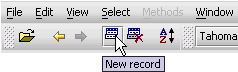
Servoy toolbars contain buttons to perform commonly-used functions. When you pass your mouse cursor over a toolbar button, you will briefly see a tooltip - a description of what the button is used for.
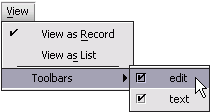
To show a toolbar:
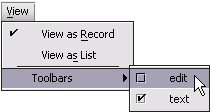
To hide a toolbar:
You can reposition or change the order of the toolbars you are
viewing at the top of the screen.
To move a toolbar:

Servoy Client has two toolbars:

These are the tools from the Text toolbar:
Icon |
Tool |
Does this |
|---|---|---|
N/A |
Font |
Displays the current font of the selected text; shows the fonts that are available for selection in a pull-down menu; the button is enabled in Data mode (edit mode). |
N/A |
Font size |
Displays the current font size of the selected text; shows the sizes that are available for selection in a pull-down menu; the button is enabled in Data mode (edit mode). |
Icon |
Tool |
Does this |
|---|---|---|
|
Bold |
Makes the selected text Bold. If the selected text is already Bold, will undo the Bold. |
|
Italic |
Makes the selected text Italic. If the selected text is already Italic, will undo the Italic. |
|
Underline |
Makes the selected text Underlined. If the selected text is already Underlined, will undo the Underline. |
|
Align left |
Aligns the selected text to the left. |
|
Align center |
Centers the selected text. |
|
Align right |
Aligns the selected text to the right. |
Icon |
Tool |
Does this |
|
Font color |
Changes the selected text to a specified color when in Data mode (edit mode). |
|
more... |
Displays more text options when in Data mode (edit mode). Additonal text options include: Supercript, Subscript, Pre formatted, Ordered list, Unordered list, and Horizontal line. |

These are the tools from the Edit toolbar:
Icon |
Tool |
Does this |
|
Open Solution |
Displays the Select solution dialog; the button is enabled in Data mode (edit mode). |
|
Back |
Navigates to the previous form displayed; keeps track of up to the previous nine (9) forms; the button is enabled in Data mode (edit mode) and Find mode. |
|
Forward |
Navigates to the next form after navigating to a previous form; keeps track of up to the previous nine (9) forms; the button is enabled in Data mode (edit mode) and Find mode. |
|
New record |
Creates a new record on the current form when in Data mode (edit mode); creates a new request in Find mode. |
|
Delete record |
Deletes the current record when in Data mode (edit mode); deletes the current request in Find mode. |
|
Sort |
Displays the Sort dialog when in Data mode (edit mode). |


